Money Flow
Loans · EMIs · Expenses · Savings Goals
Every Rupee You Owe, On One Screen
Money Flow is our own Android finance app. It pulls loans, EMIs, day-to-day expenses and savings goals into a single dashboard, scores the user's financial health out of 100, and warns them before a payment date passes. We designed, engineered and shipped it in-house — so it's a direct sample of how we build fintech and finance apps for clients.
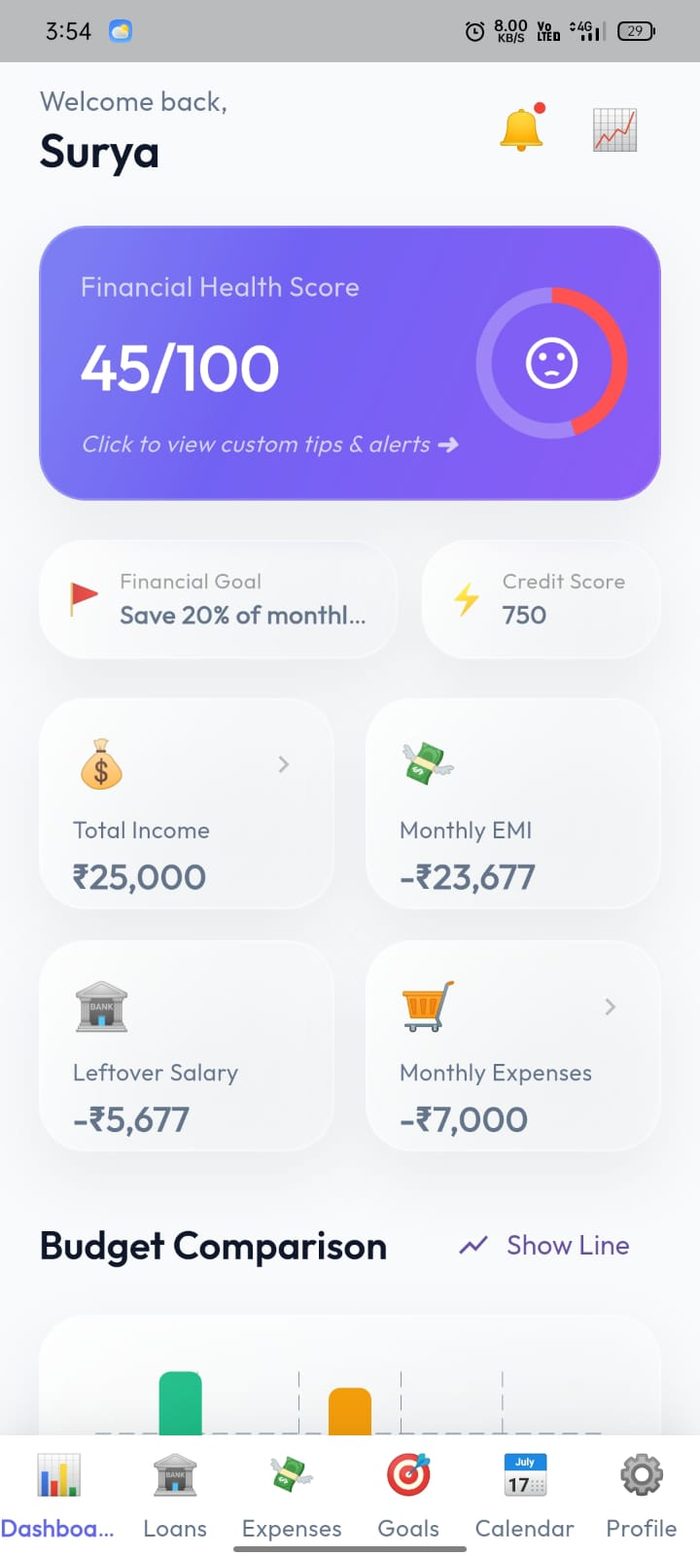
Financial Dashboard
Product
Money Flow
Category
Finance & Budgeting
Security
PIN + Biometric lock
Status
Early access testing
Finance Apps Are Where Sloppy Engineering Shows
Most budgeting apps stop at "you spent this much on food." That is useless to the millions of people whose real problem is debt — a personal loan, a vehicle EMI, money lent to a relative, three different due dates in the same week. Money Flow was built around that gap: loans and EMIs are first-class objects in the data model, not a category of expense.
That raises the engineering bar sharply. Amortisation has to be correct to the rupee, remaining principal and remaining-with-interest are two different numbers, payoff progress has to survive prepayments, and a calendar has to project every future due date. Getting that right — and wrapping it in PIN and biometric protection — is exactly the kind of work we do on fintech client projects.
How We Take an App From Idea to Store Listing
The same five stages we run for every client mobile app project — planning first, code second.
1. Research & Planning
We modelled the domain first: income, loans (borrowed and lent), EMIs, expenses, categories and goals — then defined how a financial health score should be derived from them before designing a single screen.
2. UI/UX Design
A six-tab structure — Dashboard, Loans, Expenses, Goals, Calendar, Profile — so no feature is more than one tap away, with a colour-coded card system that makes an overspend or a pending EMI visible instantly.
3. Development
Cross-platform build with the amortisation engine, category analytics, a projected due-date calendar, PIN and biometric authentication, and an AI advisor layer that answers questions about the user’s own numbers.
4. Testing & Optimisation
Real-device testing against hand-calculated loan schedules — verifying EMI amounts, total interest, remaining principal, payoff percentages and prepayment handling, plus lock-screen and re-auth behaviour.
5. Deploy & Launch
Release signing, store assets, Play Console data-safety declarations for a finance category app, then a staged rollout through closed testing before wider release.
Amortisation, payoff progress and prepayments
Each loan carries its lender, type, principal, interest rate, EMI amount and total interest — then the two figures that actually matter month to month: remaining principal and remaining with interest. A progress bar shows the payoff percentage, how many EMIs are paid, and how many months are left.
The header nets everything off — total borrowed against total lent to others, plus a combined monthly EMI figure. Pending EMIs are flagged in place so a payment can be marked paid or a prepayment recorded without leaving the screen, and a dedicated calendar projects every upcoming due date so nothing is discovered after the fact. Separate tabs keep active loans, the payoff optimiser and closed loans apart.
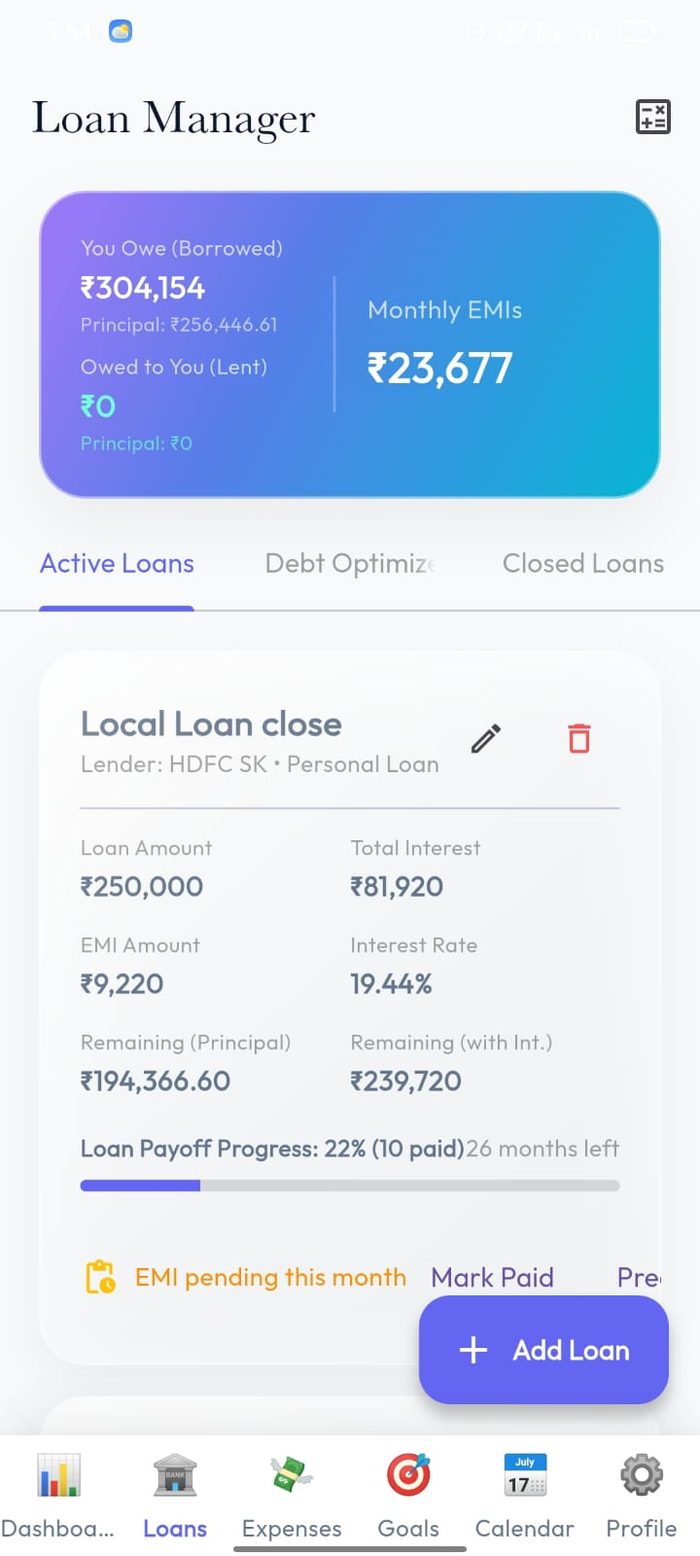
Loan Manager
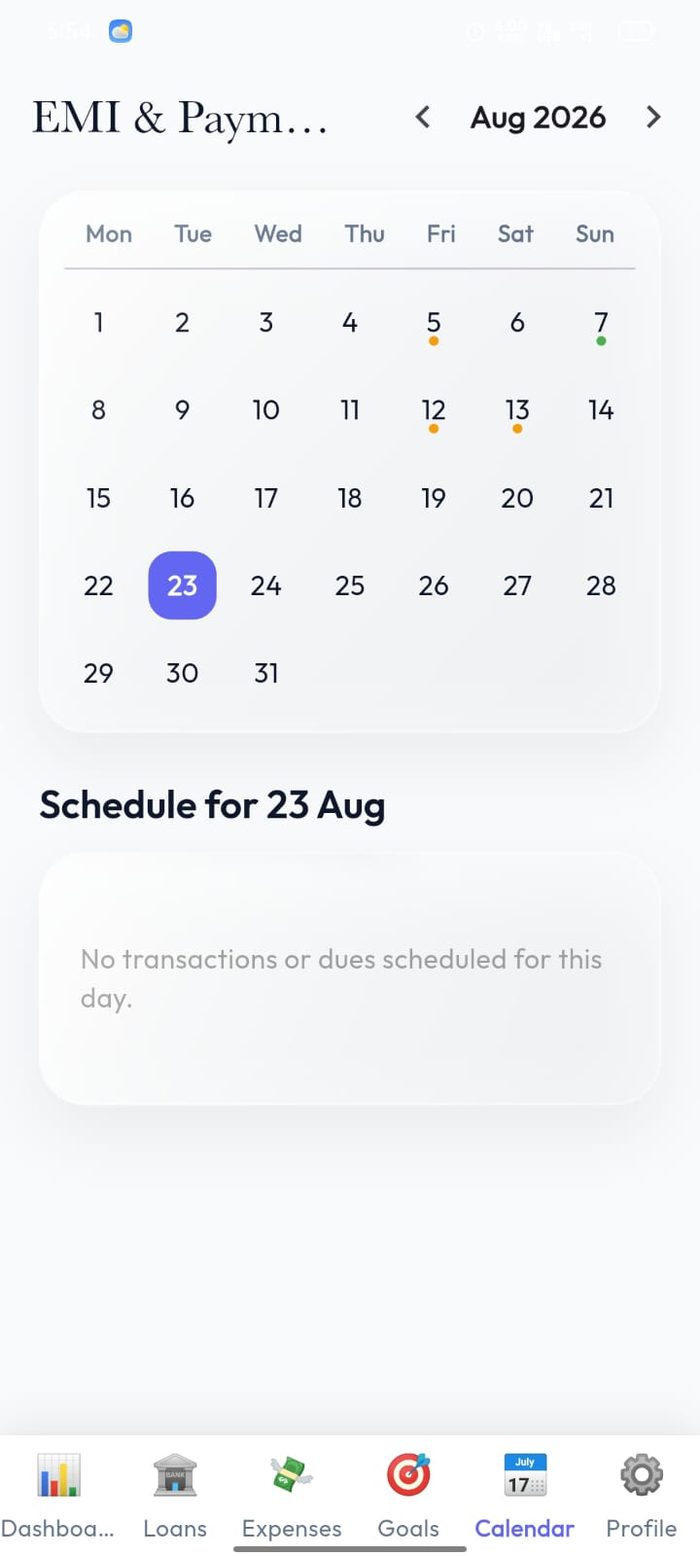
EMI Due Calendar
One number that says whether this month works
The dashboard opens with a financial health score out of 100, colour-coded and tappable for tailored tips and alerts. Under it sit the four numbers that decide the month — total income, monthly EMI, monthly expenses, and the leftover salary once both are subtracted.
When commitments exceed income, that leftover figure goes negative and red on the home screen rather than being buried in a report. A budget comparison chart, switchable between bar and line, puts planned against actual spending beside it, and monthly category caps can be set so an overspend is caught while there is still time to react.
Financial Dashboard
Where the money went, and where it should go
The expense tracker filters by timeframe and category, totals the selection at the top, and renders the split as a donut chart. Each entry records its amount, date and payment method — UPI, cash, card — and categories themselves are user-editable through a category master rather than hard-coded.
Savings goals close the loop. A goal takes a target amount, a target date, a category and a priority, then the app computes the recommended monthly saving needed to hit it and tracks progress against that. A separate goal-analytics view shows whether the plan is realistic against the leftover salary the dashboard already knows about.
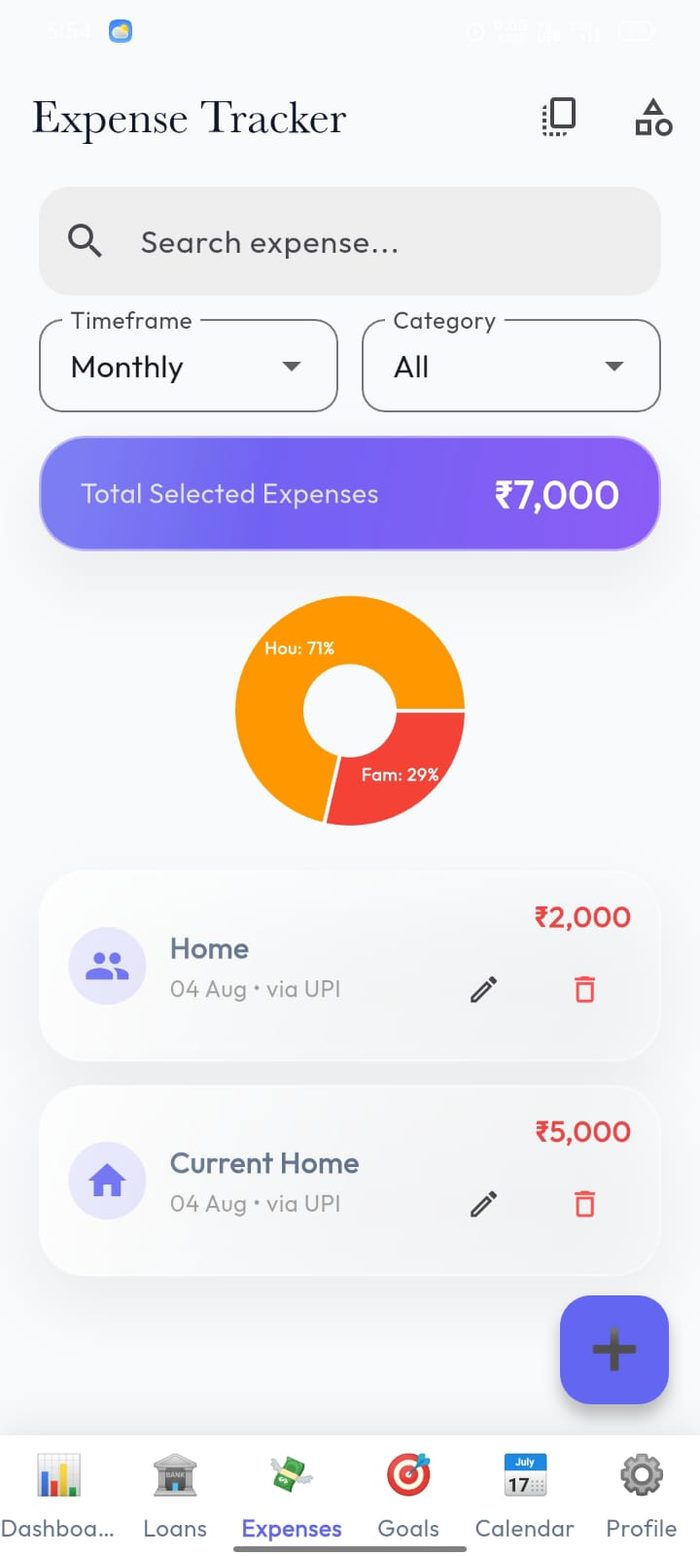
Expense Tracker
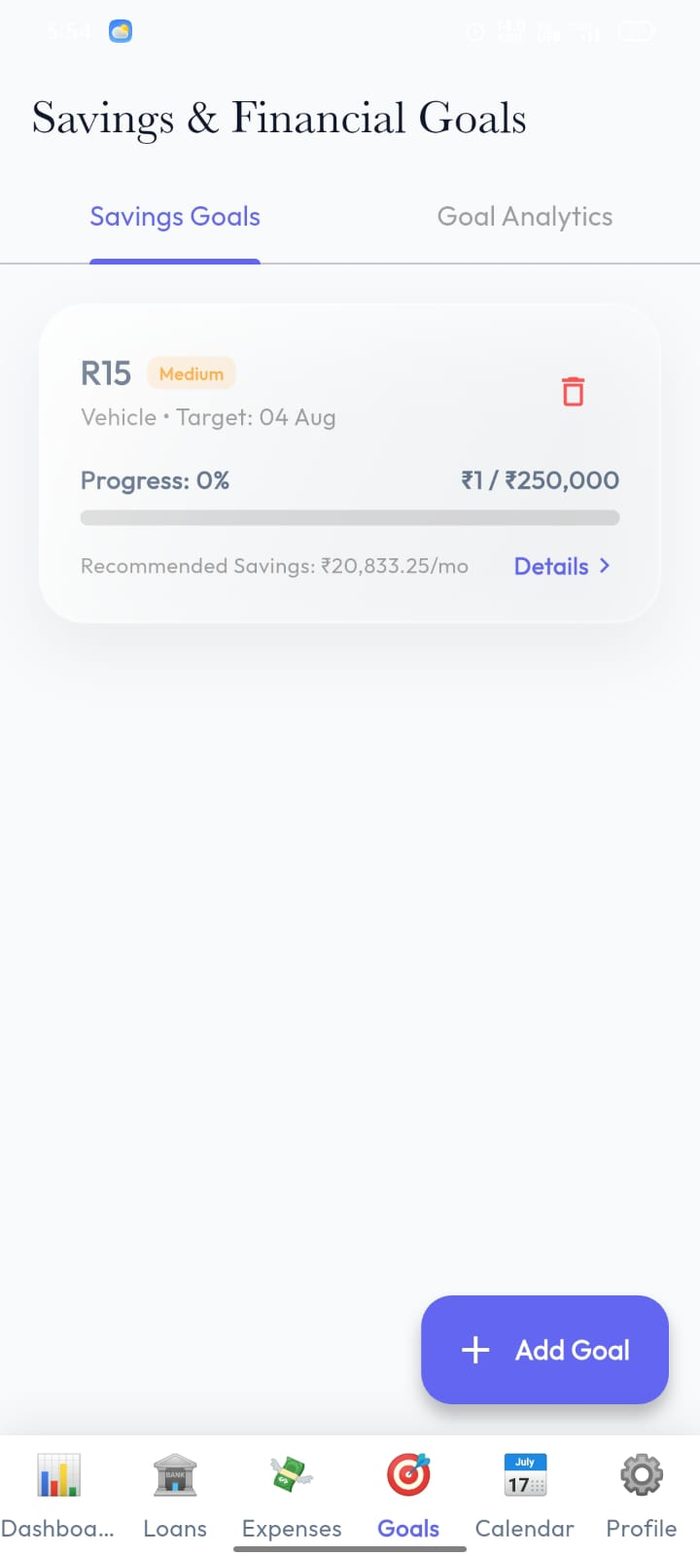
Savings Goals
Locked down, and able to answer questions
A finance app holds some of the most sensitive data on a phone, so protection is built in at the entry point: an optional PIN lock and biometric authentication via fingerprint or Face ID, both user-controlled from settings.
Alongside it sits Flow AI, a personal finance advisor the user can ask plain questions about their own financial health, plus a family share sheet that generates a monthly budget summary to send home — the practical version of "shared finances" without giving anyone else access to the app itself.
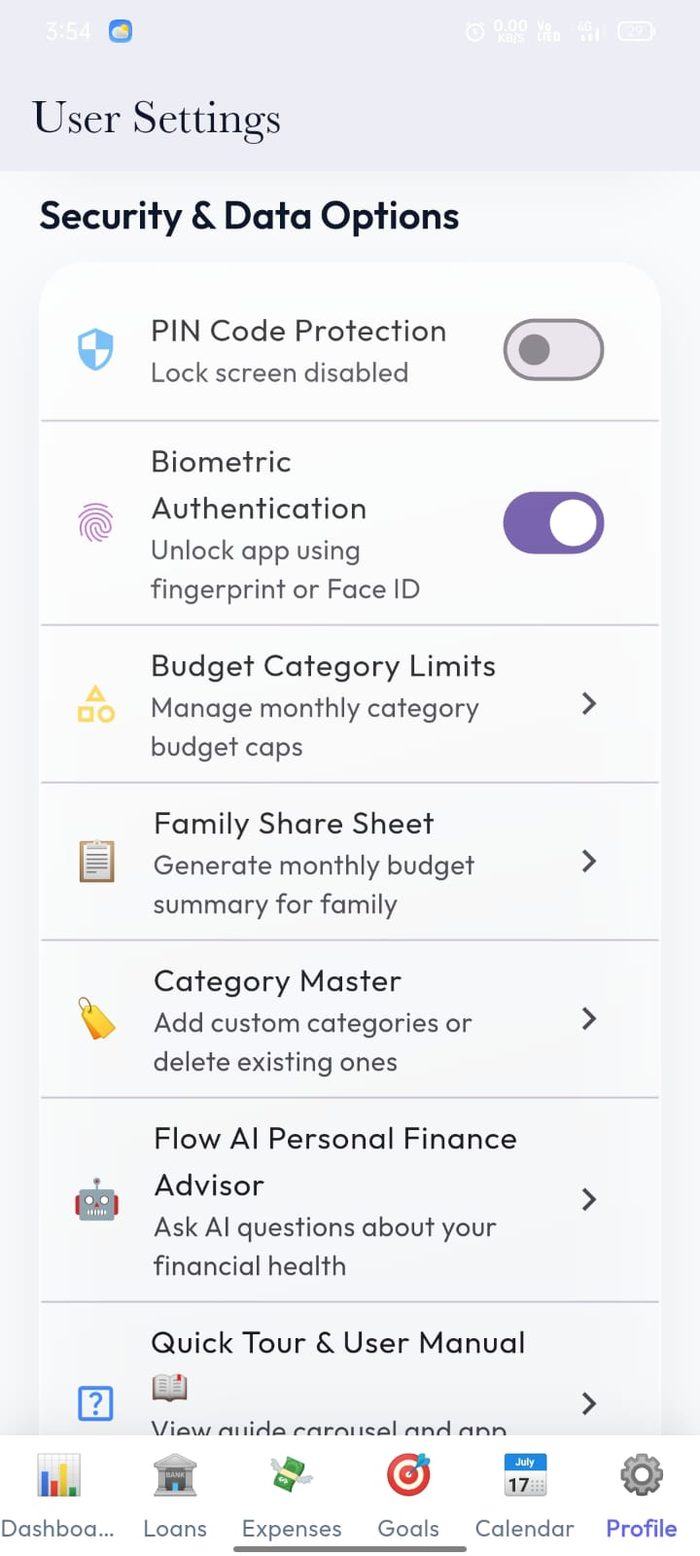
Security & Data
Technology Stack
Everything This Build Included
Building a Fintech or Finance App?
We build cross-platform Android and iOS apps from a single codebase — including the parts that have to be exactly right: financial calculations, secure authentication, analytics, and full Play Store and App Store launch. If we hold our own product to this standard, imagine what we'll do for yours.
Serving startups and businesses across India, the US, UK, Australia & Europe.